# KNOMI1
Online manual & customize UI tutorials:[here](https://bigtreetech.github.io/docs/KNOMI.html#)
# KNOMI2
Online manual :[here](https://bigtreetech.github.io/docs/KNOMI2.html#)
# Klipper config
[KNOMI.cfg](./KNOMI.cfg) is the klipper config of the [latest version firmware](https://github.com/bigtreetech/KNOMI/tree/firmware)
# Firmware source code
[Here](https://github.com/bigtreetech/KNOMI/tree/firmware) is the firmware source code for both KNOMI1 and KNOMI2.
# Firmware update
### OTA
* Download the pre compiled firmware from GitHub([KNOMI1](./KNOMI1/Firmware/knomi1_firmware.bin) and [KNOMI2](./KNOMI2/Firmware/knomi2_firmware.bin)) or build your own firmware
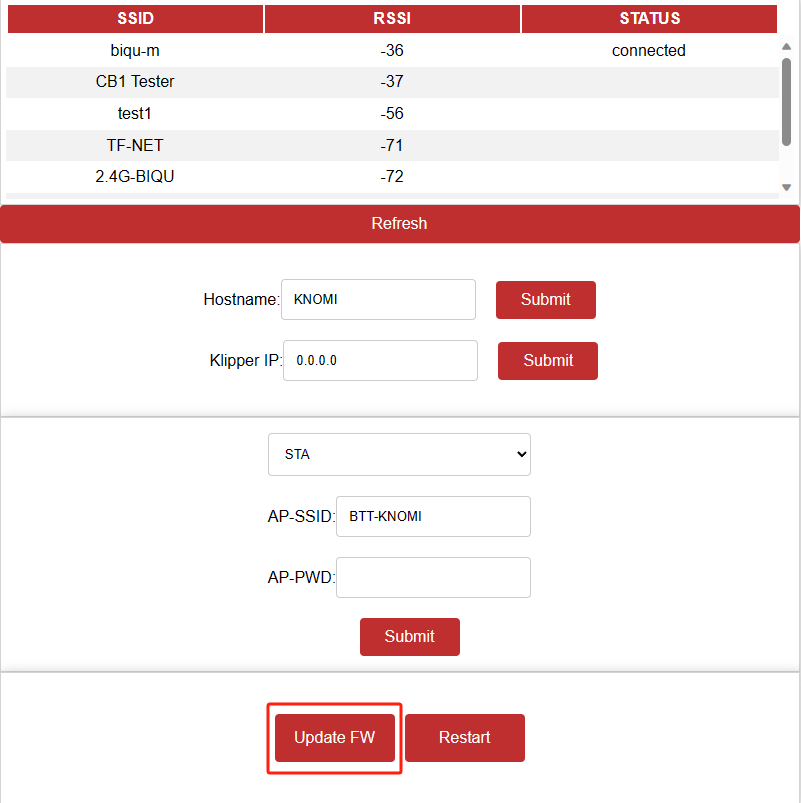
* Enter KNOMI's IP or hostname (default is `knomi.local`) in the browser of a device with the same LAN as knomi, and then click `Update FW`
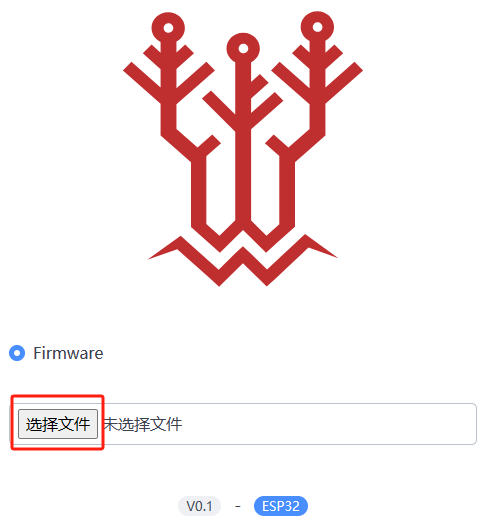
* Select the firmware file just downloaded to start updating. After the update is complete, KNOMI will automatically restart and run the new firmware.
### Using `Flash Download Tools` from Espressif
This step is used when KNOMI1 does not have OTA feature, or KNOMI cannot start and run OTA feature normally
* Refer to the steps [here](https://bigtreetech.github.io/docs/KNOMI.html#update-firmware), but use firmware files from this repository.([KNOMI1](./KNOMI1/Firmware/) and [KNOMI2](./KNOMI2/Firmware/))